Well, there was more than one diary. Right?
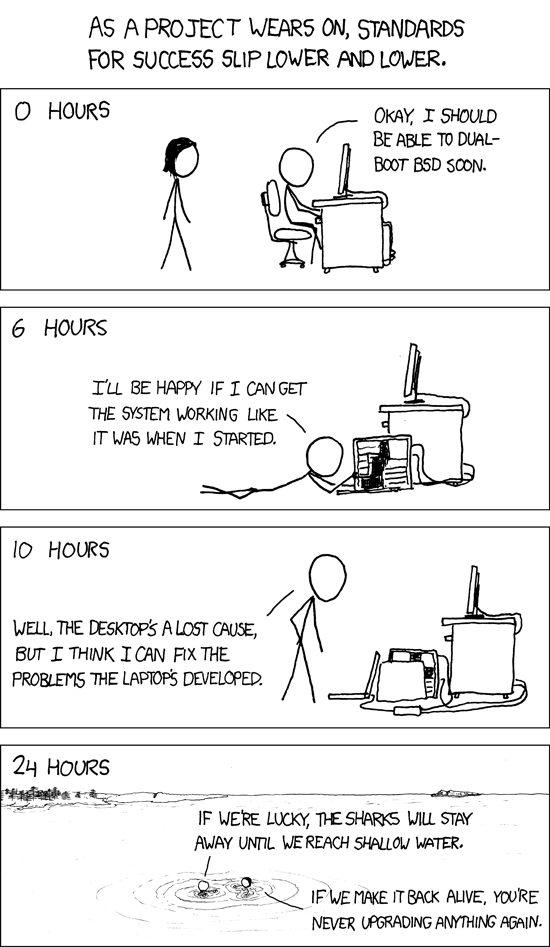
There’s an XKCD Strip, Success, from a while back, that’s all about setting up a dual-boot and the travails that come with that. My dad, who runs Linux, mainly for just web surfing and email (and also reads XKCD), made a few jokes referencing that strip regarding this project. Jokes that, ultimately, were prophetic.
So, after my last blog post, I was looking like I was in a pretty good spot – most of my media center programs were up and running (I was waiting for my Calibre library to finish syncing on Dropbox before I set that up). I’d figured out the text issues in Davinci Resolve. Some of the main games I wanted to play were installed. There was just one little problem, and that was related to the physical situation where I use this computer.
By way of explanation – if you’ve watched my game streams, you’ve probably noticed that my monitor (which also has my webcam) and my TV I use to play games, which is also hooked up to my computer, are at 90 degrees to each other. As the computer is hooked up to the TV via HDMI (either normally or with an HDMI-to-DisplayPort adapter – more on this later), in Windows, I’m able to just output audio to that device. So, whatever game is on the TV has audio coming from the TV, and whatever is running on the monitor has audio coming from the speakers that are on my desk, on either side of the monitor. I also have an optical audio out cable running to a stereo, which I can use to play music.
To finish the process of migrating how I use my computer from Windows to Linux, I needed to replicate this audio setup, or at least the speakers-and-TV part. There was just one problem: at the time I started, the TV was hooked up via the DisplayPort adapter, and the monitor was hooked up via HDMI. This had led to some minor issues earlier (the BIOS was showing up on the TV, for example), but here it was a barrier to the last step I needed to finish setting up the computer, and finally using the computer. I pinged some of the Discord servers I’d been relying on for advice and didn’t get any response, so I did some research and found some forum and subreddit posts that suggested I switch from using Pulseaudio for audio control and using Pipewire instead. So, I did that, and with the steps that I ended up using, apparently Pulseaudio ended up completely uninstalled.
It is at this point that I suspect the Linux veterans reading this are going “Oh, shit.”
So, I restarted the computer – and there was still no luck – the DisplayPort device was still not detected for audio output. It was at this point, I thought about the cable arrangement, went “Oh, this is so simple, why didn’t I think of this earlier!?” and swapped the cables around – TV to HDMI, monitor to HDMI-to-DisplayPort adapter. I powered on the computer, and lo and behold, the monitor came up with the BIOS splash screen, but the login screen came up on the TV. A little fiddling in the display manager and I had the arrangement back where it was supposed to be, monitor as primary and TV as secondary, and even better, the audio devices were detected – TV was set as HDMI audio, and the monitor was detected as DisplayPort audio. I even was able to test with a YouTube video, and all the audio outputs came out of where they were supposed to be!
Except when I restarted the computer again to check where the login was showing up on a restart, it was still showing up on the TV. Nobody had checked in at this point on my earlier Discord posts, so I returned to Reddit and forums to find a solution – this clearly can’t be an uncommon problem, considering how frequently multi-monitor displays come up in all sorts of use cases, right? And indeed, I found a possible solution incredibly quickly. It was even tailored to my Nvidia video card – all I had to do was open the Nvidia X Server Settings Control Panel, make sure my monitor was set as the primary, save to the X Configuration File, and Bob’s your uncle.
So, I did that, restarted, and lo and behold, the login prompt was on the correct screen. I signed in, went to play a YouTube video, and it wouldn’t load. I went to open a local media player program (MPC-QT), and it wouldn’t open. Then I noticed that all my audio devices were gone. Further investigation revealed that while technically my audio devices were indeed present and detected in Linux, the OS just wasn’t talking to them.
Again, I turned to Discord with my updated concerns, but nobody was available to talk. So I turned once more to forums and subreddits, searching for a possible solution – no such luck. I spent 4 hours poring over possible solutions until it was just past midnight, and I realized that I was no closer to a fix than I started, and this was going to take the rest of my weekend, with no solution in sight. And I realized the sharks were circling.
However, I still had my Windows install on my main SSD, which had been left untouched. I took a deep breath, stepped away for a minute, and came to the conclusion that this experiment had been a failure. I switched back to Windows and just wiped the Linux OS install drive. I’ve since moved a bunch of games over to that drive.
As far as what I’ve learned from this goes, I think the Linux distribution ecosystem has become very specialized. There are Linux distros that are fantastic at running media centers and network-attached storage (and just that). Bazzite is almost certainly excellent at being a gaming OS – but not good at doing video editing or doing the media storage stuff. There are a few Linux distros that are probably perfect for video editing.
It’s just that I need one that will do all three.
Will I return to Linux again? Probably. However, if I do, I’m going to do it with a device that’s only going to run Linux, and might even come with Linux pre-installed, and it’s also not going to be replacing this computer – just some of the functionality (like a media server). It will be bespoke.
However, not right now. Right now, I need a break from Linux.
Please support my Patreon: http://www.patreon.com/countzeroor
Buy me a coffee at Ko-Fi: https://ko-fi.com/countzero
Watch my Live-Streams on http://twitch.tv/countzeroor
Check out my Let’s Plays at https://www.youtube.com/@CountZeroOrPlays